` : authorize a new admin -- the token is located in secrets.yaml
- `/adminlist` : list the admins
- `/authorize` : allow a groupchat to use a certain command
More information on the [repository](https://github.com/clicepfl/roboclic-v2/#readme).
# IC Plays Pokemon
A collaborative game derived from the concept of [Twitch Plays Pokemon](https://en.wikipedia.org/wiki/Twitch_Plays_Pok%C3%A9mon) (but without the Twitch part). It comes with an interface for players to select a command, then the backend plays the majority command each cycle in the actual Pokemon game. The source code can be found here [IC Plays Pokemon](https://github.com/clicepfl/ic-plays-pokemon).
# Overclicked
Overclicked is a web application created by CLIC, used for tracking and managing orders at student-organized events. It provides simple interfaces for event staff in various roles (at the register, in the preparation area, etc) to monitor incoming orders and update their status in real time.
It was mainly used for Subsonic, to manage Croque-Monsieur orders in real time.
The source code can be found here: [Overclicked](https://github.com/clicepfl/overclicked)
# Clicketing V1 (outdated)
Clicketing registration management system, created by CLIC, for CLIC.
> Important Note
>
> This page is about the first version of Clicketing, which was last used in Spring 2024 and has now been replaced by an entirely new version. You can find the codebase for this older version on the [GitHub repository](https://github.com/clicepfl/clicketing-archived).
>
> See more about the newest version of Clicketing here : [Clicketing](https://clic.epfl.ch/wiclic/books/it/page/clicketing).
[](https://clic.epfl.ch/bookstack/uploads/images/gallery/2023-11/image-1700494660754.png)
#### How it works
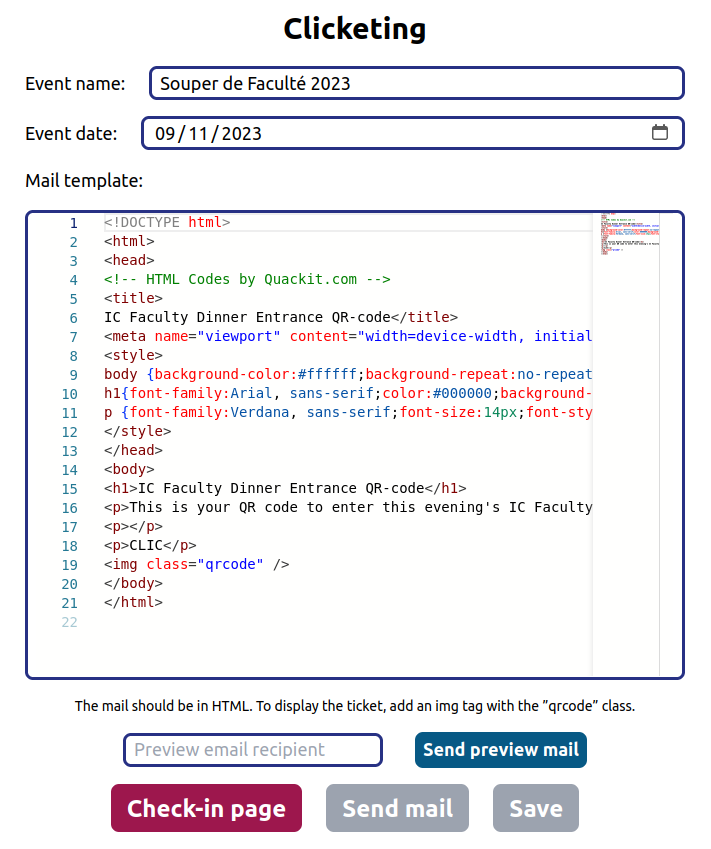
Before an event, Clicketing sends an e-mail to each participant containing a QR Code to facilitate entry. At the start of the event, everyone presents themselves at reception with their QR Code, which staff can scan to confirm registration and attendance.
#### Login
The admin password is stored on the [Vaultwarden](https://clic.epfl.ch/armoire).
#### Utilisation
The service allows you to manage registrations by event. On the [main page](https://clic.epfl.ch/clicketing), you can create and edit events. Each event is assigned a name, a date and an e-mail template.
The mail can be sent to all participants exactly once, using the `Send mail` button. To check the email, you can send it to a specific person, by entering their address in the `Preview email recipient` field and pressing `Send preview email`. This email will contain a random QR Code, and is only to be used to view the visual rendering of the template.
To add participants, you need to use the HTTP API. The ideal way is to create a script on the registration sheet, in order to generate a JSON. For more information, see dev's documentation on the [repository](https://github.com/clicepfl/clicketing).
### Possible improvements
- Use camipro readers instead of QR Code (see [Camipro API](https://clic.epfl.ch/bookstack/books/it/page/camipro-api)).
- Security: Sessions with expiry date.
- Additional data to be inserted in e-mail (name, date, menu, etc.).
- Automatic insertion of participants when registering on form.
- Insert/edit/archive participants (indicate payment, etc.).
- Automatic sending of email upon registration/payment.
# Save the Date
Pour savoir comment faire pour faire un Save the Date en tant que responsable communication, voir [Save the Date](https://clic.epfl.ch/wiclic/books/communication/page/save-the-date).
Le Save the Date est généré sur le site ici: [https://clic.epfl.ch/save-the-date](https://clic.epfl.ch/save-the-date), à partir des infos entrées dans Directus.
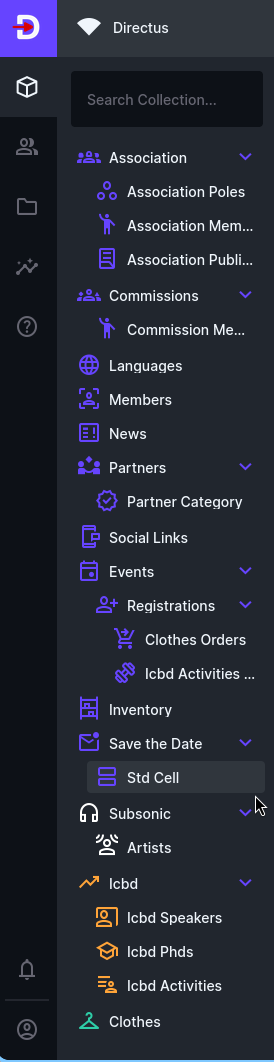
Pour éditer une entrée, il faut aller dans Save the Date > Std Cell
[](https://clic.epfl.ch/wiclic/uploads/images/gallery/2026-09/image-1790783158094.png)
Il serait utile de conserver un historique des save the dates, en le transformant en collection dans Directus (comme ICBD, pour conserver le Save the Date de chaque semestre). Actuellement, les commissions et la CLIC modifient les cellules existantes directement, alors que conserver les anciennes version serait utile.
# Directus
# Directus
Directus is our content management system (CMS), see [Directus](https://clic.epfl.ch/wiclic/books/presidence/page/directus) in the common articles.
It is effectively the database management system for everything that may need to be changed by the committee or commissions, from the website (including Game\*'s) through event inscriptions.
Directus is separate from anything regarding authentication or Nextcloud.
## User management
A user is created automatically when someone tries to log in with KeyCloak.
By default, they do not have a role and therefore no access to anything.
Roles are non-cumulative and can be set in the users tab.
The users panel is also how we can generate tokens for services such as [Roboclic](https://clic.epfl.ch/wiclic/books/it/page/roboclic).